Mouse Double Click Test: Find Out If Your Mouse Is Misfiring
Your mouse looks fine. It moves. It clicks. But something is off. Files open when you only meant to select them. Drag actions break halfway through. In games, your shots fire twice, or your menus flash open on a single press. You are probably dealing with a double-clicking mouse, and you can confirm it in under 30 seconds with this free online tool.
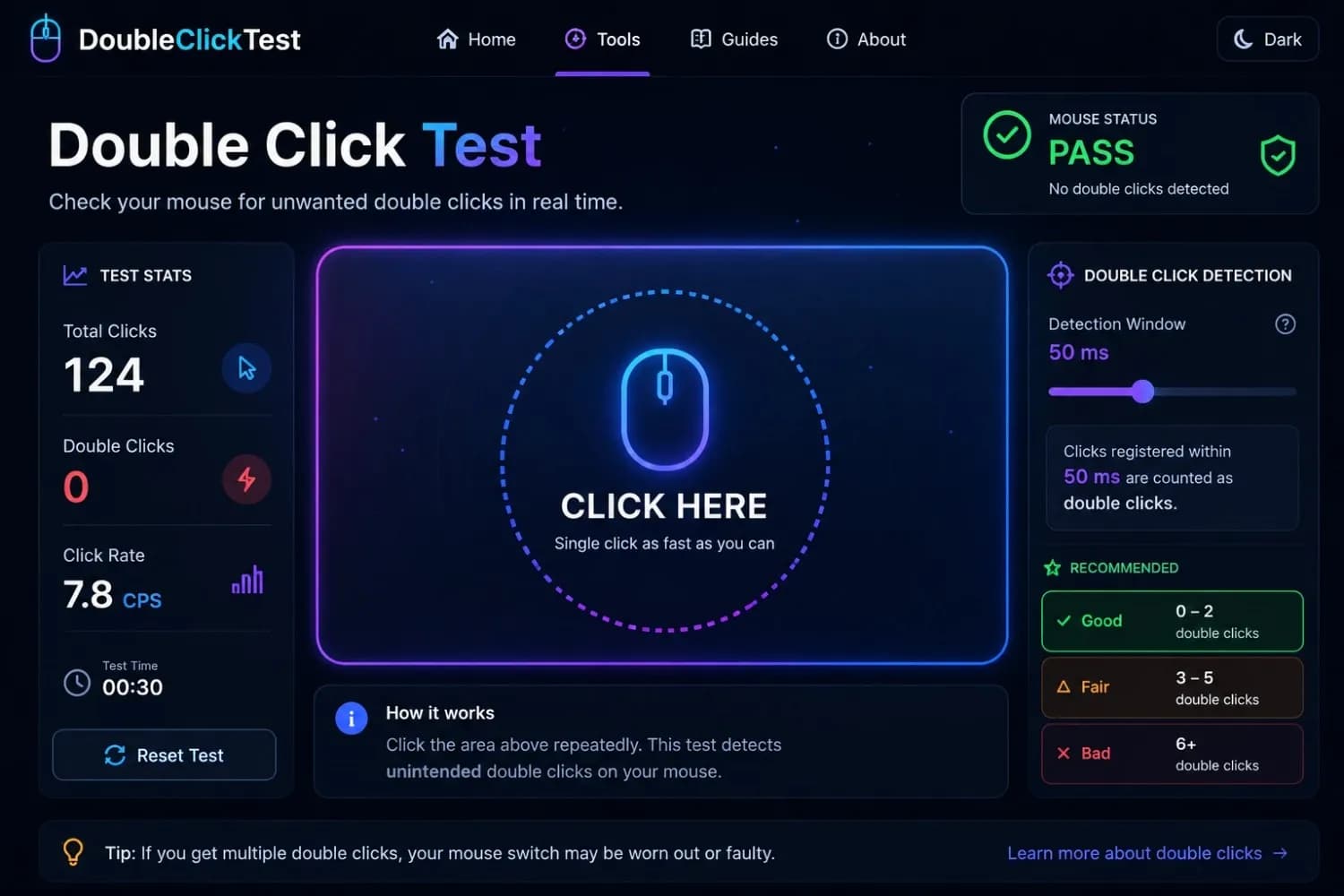
Click inside the test area below. Do not double-click on purpose. Just click normally, the way you always do. The tool watches every input and flags any moment one click registers as two. If double-clicks keep appearing during single-click inputs, your mouse has a chatter problem.
Click once, normally— like clicking any link. Do not double-click on purpose. We're checking whether a single press ever fires twice.
Debounce Threshold
Window for two clicks to count as one
Total Clicks
0
recorded
Chatter Flags
0
unintended doubles
Avg. Gap
—
ms between clicks
Left Button
0 / 0
clicks / flags
Middle Button
0 / 0
clicks / flags
Right Button
0 / 0
clicks / flags
What Is a Mouse Double-Click Test?
A mouse double-click test is an online tool that records how your mouse responds when you press the button once. It measures the gap between signals and flags any moment your hardware sends two click inputs from a single press. That gap is called the debounce window, which is the short pause the system uses to decide whether two quick signals are one double-click or an accidental second registration.
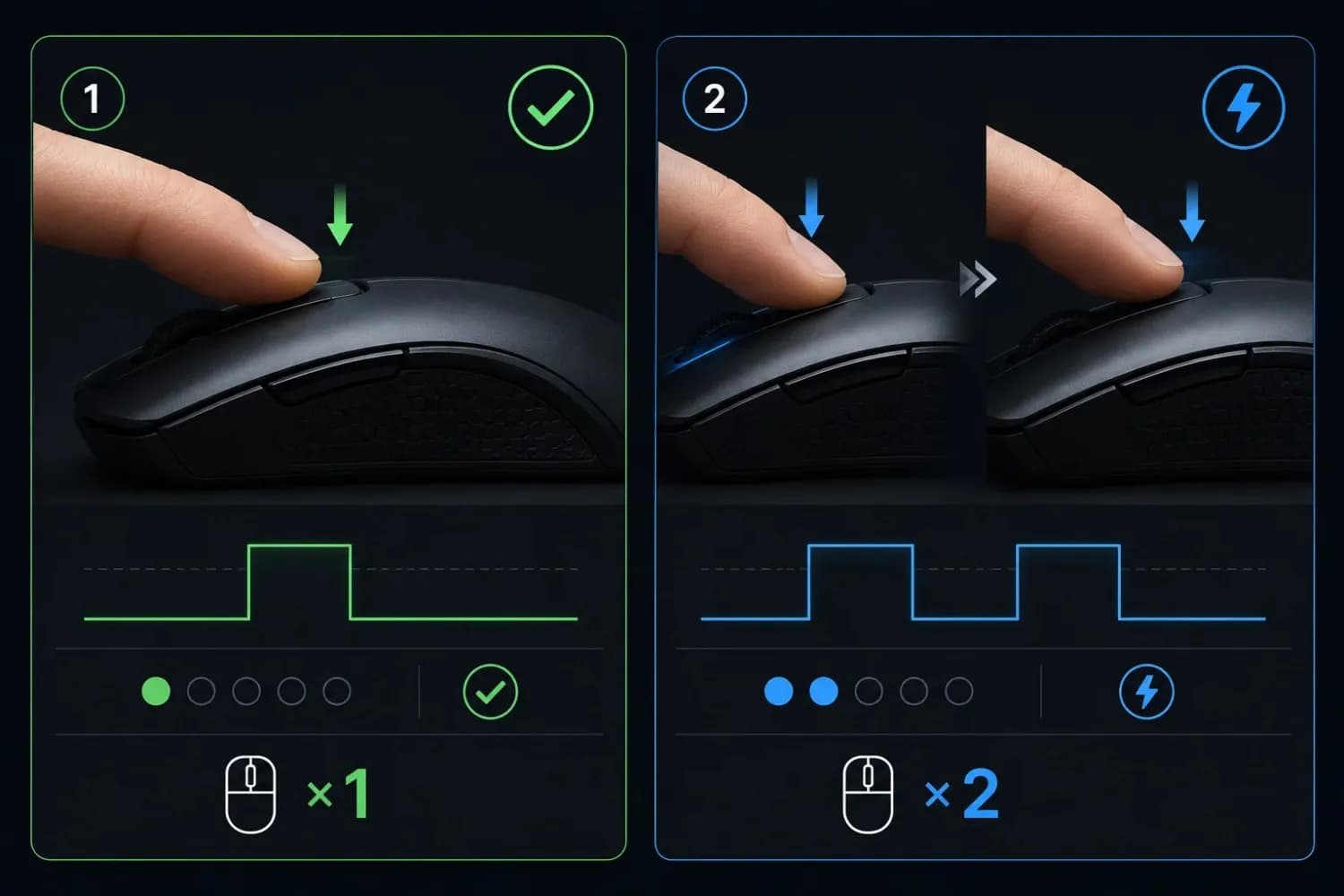
The problem being tested here has a specific name in the hardware world: mouse chatter. It happens when the internal switch inside your mouse button stops bouncing cleanly. Instead of a single, clean signal on press and release, the switch fires an extra contact, usually within 10 to 80 milliseconds, before the mechanical bounce settles. Your operating system counts that extra signal as a second click.
This test catches it by logging every click event your browser receives and comparing the timing between them. A clean single click produces one event. A chattering click produces two events in rapid succession, well inside the window that your OS would read as a double-click.
Signs Your Mouse Is Double-Clicking
If you are not sure whether to run the test, look for these patterns in daily use:
- Files or folders open when you only meant to select them
- Dragging fails, the file drops, or the selection breaks midway
- Text gets highlighted twice when you click once at the start of a word
- In games, a single press fires two shots or opens a menu
- Right-click context menus appear and disappear instantly
- The problem gets worse when you click faster
Any two or three of these appearing regularly is a strong signal. This test confirms it.
How to Use the Double-Click Test
The test has two phases. Running both gives you the full picture of your mouse's condition.
Phase 1: Test for Unintended Chatter (Single Clicks Only)
This is the main test. Click inside the tool area using normal, single clicks, the way you would click any link or icon. Do not try to double-click. Click at your natural pace, not unusually fast or slow. Watch the double-click counter. If it rises during single-click inputs, your mouse is firing extra signals it should not be.
Run 20 to 30 single clicks before concluding. An occasionally flagged event from a very fast click may be borderline. Multiple flags appearing at a regular pace means the switch is genuinely misfiring.
Phase 2: Test Intentional Double-Click Recognition
Now try deliberate double-clicks at your normal speed. These should register cleanly as double-clicks. If they do not, if the tool counts them as two separate single clicks instead, your mouse either has a high debounce delay or the switch has developed a slow response. This is a different problem from chatter, but worth knowing about if you rely on double-click actions in your workflow.
Most healthy mice pass both phases without any flags. A mouse with a worn switch will fail Phase 1 almost immediately.
Understanding the Timing Threshold
The tool uses a timing window, measured in milliseconds, to decide whether two rapid signals count as a double-click or as two separate clicks. Most systems default to 500 ms. Competitive gaming mice are often set lower, around 200 ms, because faster double-click registration helps in gameplay.
A lower threshold is more sensitive. It catches chatter faster but might also flag very fast intentional clicks as doubles. A higher threshold gives your clicks more room, but can miss borderline chatter. The default setting works for most diagnostic purposes. If you game competitively, testing at 200 ms gives a more accurate picture of how your mouse behaves in-game.
Why Is My Mouse Double-Clicking?
This is one of the most common hardware complaints across all mouse categories, budget mice, premium gaming mice, and office peripherals alike. Several things cause it, and knowing which one applies to your situation determines whether you can fix it or need a replacement.
Worn Mechanical Switch
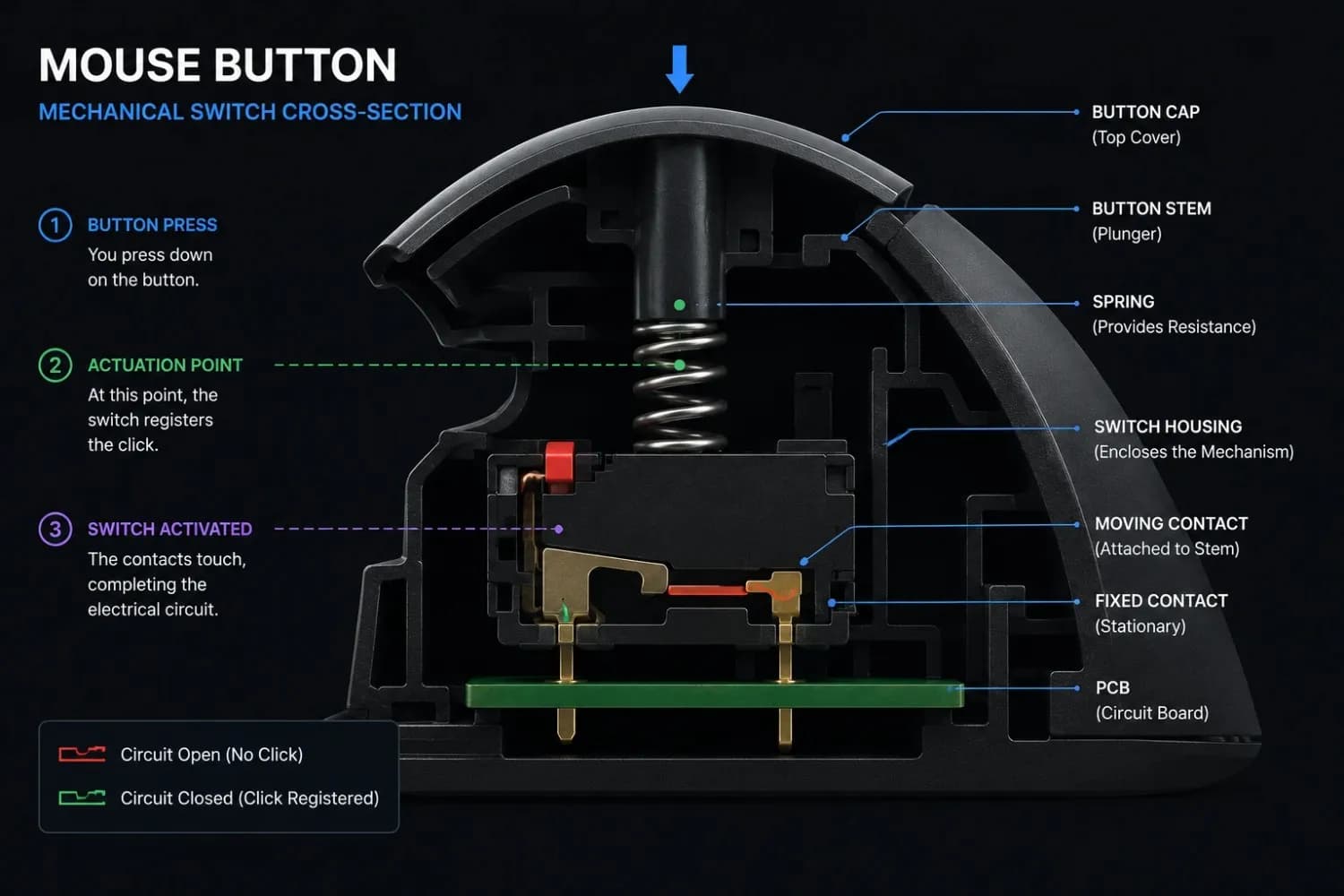
This is the most common cause by a significant margin. Traditional mouse buttons use mechanical micro-switches, small spring-loaded components that complete an electrical circuit when pressed. Over time, the metal contacts inside wear down. The contact surface develops microscopic pitting, which means the circuit closes more than once on a single press before the bounce fully settles.
Gaming mice rated for 20 million clicks sound impressive, but a player who averages 100,000 clicks per day in fast-paced games hits that ceiling faster than expected. Budget mice use lower-rated switches that degrade even sooner. Once a mechanical switch starts chattering, the problem typically gets worse over time, not better.
The pattern shows up quickly at lower price points. One user posted about their budget gaming mouse, the MS-G260, starting to double-click within a month of purchase, with the frequency getting worse every day. They had already gone through two identical models with the same problem. Replies from experienced members pointed to the switch quality in that price bracket as the likely culprit, with several noting they'd seen the same behaviour on similar budget models. The suggested fixes were straightforward: either solder in a replacement switch (the screws are hidden under the skates) or switch to a brand with stricter quality control on its switches. One commenter added that optical switches skip this failure mode entirely, since there are no metal contacts to degrade.
The switch quality is the variable, not the brand name on the box, as confirmed by a gamer who ran through the same model twice and got the same result each time.
Dust and Debris Around the Button
Dust particles and small debris can settle around the button housing and interfere with how the switch actuates. When the contact surface cannot press cleanly, it can trigger an inconsistent bounce, producing an extra signal on some presses but not others. This explains why some users see the problem appear and disappear depending on how they clean their desk space.
Compressed air directed at the button gaps can clear this kind of debris. It is worth trying before assuming the switch itself is damaged. If cleaning fixes the problem for a week before it returns, the debris was a contributing factor, but the underlying switch is likely also degrading.
Optical Switches Are a Different Case Entirely
Many modern gaming mice use optical switches instead of mechanical ones. Razer uses them across several product lines. Logitech has introduced them in their LIGHTFORCE hybrid switches. Instead of metal contacts, optical switches use an infrared light beam to detect actuation; there is no physical contact to wear down, and no mechanical bounce to produce chatter.
If your mouse has optical switches and you are seeing double-click behavior, the cause is almost certainly not hardware degradation. It is much more likely to be a software profile error, a firmware bug, or an incorrect debounce setting in your mouse software. Check your mouse manufacturer's software for a debounce or click latency setting and reset it to the default before assuming the hardware is faulty.
System Settings and Driver Issues
Sometimes the mouse hardware is perfectly healthy, and the problem lives in the operating system. The double-click speed slider in Windows controls how quickly two clicks must occur to count as a double-click. If it is set very high (toward Fast), normal single clicks made in quick succession may register as doubles, not because of switch bounce but because Windows is tuned too aggressively for your clicking style. Setting it to the middle position is the recommended starting point for general use.
To check this on Windows: open the Control Panel, go to Mouse settings, and find the Button tab. The Double-click Speed slider is there. Move it one or two notches toward Slow and retest. An outdated or corrupted mouse driver can also produce inconsistent click registration. Updating through Device Manager or your mouse manufacturer's software resolves this quickly and costs nothing to try before opening the mouse up. While you are in that software, it is worth confirming your DPI is set correctly too; see our guide on how to change DPI on a mouse if anything looks off.
Single Click Registering Twice: What It Means for Your Setup
When a single click registers twice, the downstream effects depend on what you are doing. For everyday desktop use, the most common symptoms are accidental file opens and broken drag-and-drop. For design and photo editing work, it disrupts selection precision and can corrupt layer or object operations that depend on a clean single click.
For gaming, the consequences are more direct. In tactical shooters, a double-registered click fires a second shot in a situation where you intended only one. In strategy games, it can send units to a location twice or activate an ability on the wrong target. In anything involving drag inputs, map panning, skill-shot aiming, and item dragging, the double registration breaks the drag mid-action.
It also creates a frustrating diagnostic problem. Because mouse chatter is intermittent and not always visible on screen, players often blame mechanics, game code, or input lag before tracing the issue to the mouse itself. Running this test gives you a definitive answer in one session.
How to Fix a Double-Clicking Mouse
Work through these in order before spending money on a replacement. Several of them cost nothing and take under five minutes.
Clean the Button Area
Use compressed air to blow debris out from around both mouse buttons. Hold the can upright, use short bursts, and angle toward the button gaps. Follow with a cotton swab dampened with isopropyl alcohol along the button edges. Let it dry fully before testing again. This solves the problem more often than expected, particularly on mice that have been used on cloth surfaces or in dusty environments.
Adjust Double-Click Speed in Windows
Open Control Panel, navigate to Mouse, and check the Buttons tab. Move the Double-click Speed slider one or two notches toward Slow. Apply and retest. This does not fix a genuinely failing switch, but it can eliminate false positives caused by a Windows setting that is calibrated too aggressively for your clicking style.
Update or Reinstall Mouse Drivers
Open Device Manager (Windows key + X, then Device Manager), expand Mice and other pointing devices, right-click your mouse, and select Update Driver. If no update is found, try uninstalling the device and then reconnecting the mouse to force a clean driver installation. For mice with dedicated software (Logitech G Hub, Razer Synapse, SteelSeries GG), check for a firmware update in the application.
Switch to a Different USB Port or Cable
A loose or marginal USB connection can cause erratic click registration. Try a different USB port, preferably one directly on the motherboard rather than a hub or front-panel port. For wireless mice, check the receiver position and battery level. Swap to a wired connection temporarily to rule out interference if you are on a wireless mouse with an intermittent issue.
Replace the Mouse Switches
If the above fixes do not work, the switch itself is the problem. Replacing it requires soldering, opening the mouse, desoldering the old micro-switch, and soldering in a replacement. Omron D2FC-F-7N switches are a common replacement part used across dozens of mouse models and cost very little per unit. If you are comfortable with a soldering iron, this extends a mouse's life significantly. If not, the next option applies.
When Replacing the Mouse Makes More Sense
If the mouse is a budget model with low-rated switches, the repair cost in time and parts may not be worth it. If the same mouse model has produced the problem multiple times, the switch quality itself is the ceiling. Upgrading to a mouse with Omron switches rated for 50 million clicks or a model with optical switches removes the mechanical failure point entirely.
Double Click Test for Gaming Mice
Gaming mice are not immune to this problem. They are often used more intensively than office mice, which accelerates switch wear faster than the rated click count suggests. A mouse with a 20-million-click rating used across four hours of heavy gaming daily will reach its practical switch lifespan sooner than one used for light desktop tasks.
The impact on competitive play is real. In CS2, Valorant, or Apex Legends, double-clicking a weapon key swaps to your secondary and back, something that should never happen from a single keypress. In building-heavy games, accidental double registration on a placement action can trigger a second structure placement or cancel the build mid-motion. If your aim also feels off, run your numbers through the eDPI calculator to rule out a sensitivity problem alongside the hardware one.
Running this test regularly, every few months or when something feels inconsistent, lets you catch early chatter before it starts costing you in-game. A mouse that shows occasional flags in the test is already degrading, even if the problem is not yet obvious in gameplay. Addressing it early is less disruptive than diagnosing it during a match.
Once you have confirmed your mouse is clicking cleanly, verifying that your sensor is tracking accurately is the natural next step. Use the DPI Analyzer to measure whether your real hardware output matches the value shown in your mouse software.
Double Click Test vs Click Speed Test: Key Differences
These two tools look similar on the surface, both involve clicking and both count inputs. They test completely different things.
| Feature | Double Click Test | Click Speed Test |
|---|---|---|
| Main Purpose | Detects unintended double-firing from single clicks | Measures how many clicks you can make per second |
| What It Tests | Mouse switch health and chatter behavior | Clicking speed and stamina |
| Input Type | Single, normal-pace clicks | As fast as possible |
| Output | Chatter flags, timing data, pass/fail indicator | Clicks per second (CPS) score |
| Best For | Hardware diagnosis | Aim training warm-ups, gaming benchmarks |
Running a click speed test on a mouse with chatter will give an artificially inflated CPS score; the double-registered clicks count as extra inputs. This is why some users discover their mouse has a problem when their CPS score seems suspiciously high. The double-click test isolates the hardware behavior and gives you a clean reading without interference from your click speed. For the same reason, it is worth checking how accurate a DPI analyzer really is, since sensor inconsistency can distort more than just your click count.
Conclusion
Mouse chatter is one of the most overlooked hardware problems in gaming and productivity setups. It hides behind vague symptoms, files opening unexpectedly, broken drags, inconsistent in-game actions, and gets misattributed to software or user error far more often than it should. This double-click test surfaces it directly.
Run Phase 1, run Phase 2, and check your results against the guidance above. A clean test means your hardware is working as expected. Repeated flags mean the switch is degrading, and a fix or replacement is warranted. Either way, you know exactly what you are dealing with, which is the starting point for fixing it.
For players working on aim consistency after clearing hardware issues, reading up on how to check mouse DPI is the logical follow-up. Once your clicks are clean, making sure your sensor output matches your configured DPI closes the loop on hardware calibration. From there, run the mouse sensitivity converter to make sure the feel carries cleanly into every game you play.
Related Tools and Guides
- DPI AnalyzerMeasure the DPI your mouse sensor actually delivers, using nothing but a ruler and your browser.
- Mouse Sensitivity AnalyzerEnter your DPI, sensitivity, and game type to get a genre-fit verdict and a tuning range for your aim.
- How to Change DPI on a MouseAdjust your DPI using software or built-in buttons, with quick setup steps for Logitech, Razer, SteelSeries, and more.
- How to Check Mouse DPI Without a DPI AnalyzerUse manufacturer software, Windows settings, or a quick ruler method to find your exact sensitivity — no analyzer required.
Check if your sensitivity is dialed in
Open the Sensitivity AnalyzerFrequently Asked Questions
A double-click test is a browser-based tool that records how your mouse button responds during single-click inputs. It logs every click event and flags any moment your hardware sends two signals from one press. If double-click events appear consistently during normal single clicking, the mouse switch is misfiring, a problem called mouse chatter.
Yes. The tool runs entirely in your browser at no cost. No account, no subscription, and no software download required. Open the page, click inside the test area, and read your results immediately.
The most common cause is a worn mechanical switch inside the mouse button. Over time, the metal contacts degrade and produce an extra electrical signal before the bounce settles; your system reads that extra signal as a second click. Dust, a misadjusted double-click speed setting in Windows, or an outdated driver can also produce the same symptom. Work through the fixes in the section above before deciding the mouse needs replacing.
Yes. The tool works in all major browsers on macOS, including Safari, Chrome, Firefox, and Edge. The same two-phase test applies, Phase 1 for chatter detection via single clicks, Phase 2 for intentional double-click recognition. macOS does not have the same pointer acceleration impact on click behavior that Windows does, so no additional settings adjustment is needed before testing.
Yes, in two ways. First, if Windows Double-click Speed is set too high, fast single clicks can be misread as double-clicks by the operating system, even when the switch is healthy. Second, a corrupted or outdated mouse driver can cause inconsistent input registration. Both are worth ruling out before blaming the hardware.
Open File Explorer and single-click a file. If it opens instead of highlights, your mouse is double-clicking. Try to drag a file to a new folder; if it drops or releases unexpectedly, the same issue is likely. These symptoms are reliable indicators, but the test above gives you precise timing data rather than a subjective observation.
Not always, but usually. The most common cause is physical switch degradation, which is a hardware issue. Software causes, Windows settings, driver bugs, debounce configuration in mouse software, are less common but worth eliminating before opening the mouse up or replacing it.
Yes. Dust and small particles can settle between the button and the switch housing, preventing clean actuation and causing irregular contact behavior. Compressed air directed at the button gap is the first thing to try. If the problem improves immediately after cleaning but returns within a week or two, the switch itself is also degrading, and cleaning provides only temporary relief.
Not immediately. Try cleaning it first, then check your Windows settings and driver. If neither works and you are not comfortable replacing the switch yourself, the choice depends on the mouse's value. A budget mouse under $30 is generally not worth the repair effort. A premium gaming mouse is worth replacing the switch. Omron replacement switches cost very little, and soldering the repair is straightforward if you have basic skills.