eDPI Calculator: Work Out Your Gaming Sensitivity
Most players never check this number. They set a DPI, pick a sensitivity that feels somewhere between comfortable and playable, and then spend months wondering why their aim feels inconsistent. The answer is almost always hiding in a single figure: their eDPI, or effective dots per inch.
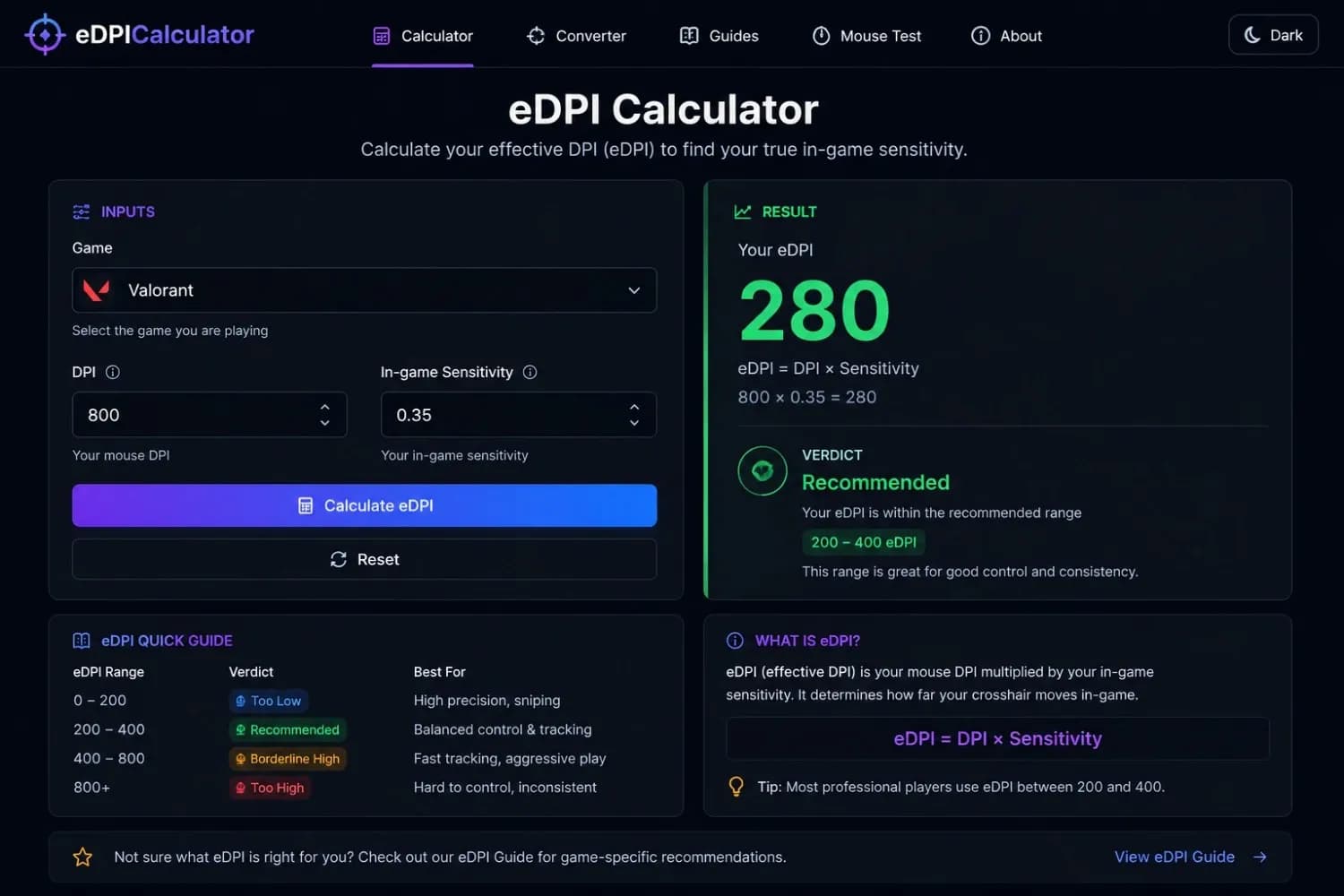
This free eDPI calculator works it out in under ten seconds. Enter your mouse DPI and your in-game sensitivity. The tool gives you your eDPI, flags whether that number is likely helping or hurting your aim, and shows you how it compares to what players in your game typically run. No account needed. Nothing to download.
Valorant’s competitive range runs 190–450 eDPI, with most ranked players clustering around 275–320.
Your eDPI
280
eDPI
In the recommended range for ValorantCM / 360°
46.7 cm
Distance to fully rotate
vs. Pro Average
-7% lower
Pro average is ~300 eDPI
Aim Style Fit
Arm aim
Needs more desk space and forearm movement
How to Calculate Your eDPI
Working out your eDPI takes a single multiplication. Find your mouse DPI in your mouse software, Logitech G Hub, Razer Synapse, SteelSeries GG, or Corsair iCUE; all show it on the main device screen. Then check your in-game sensitivity in the game's settings menu. If you are not sure how to adjust it, see our guide on how to change DPI on a mouse.
Multiply the two numbers together. That is your eDPI.
One thing worth checking before you trust that number: if your mouse has been through heavy use or you have changed surfaces recently, the configured DPI and the actual hardware output can drift apart by 5–10%. If you want your eDPI calculation to reflect what your sensor is genuinely doing rather than what the firmware targets, run a quick physical test with the DPI Analyzer first and use the measured figure instead.
Example eDPI Calculations
| Game | DPI | Sensitivity | eDPI | Verdict |
|---|---|---|---|---|
| Valorant | 800 DPI | 0.35 sensitivity | 280 eDPI | Optimal range |
| CS2 | 400 DPI | 2.0 sensitivity | 800 eDPI | Optimal range |
| Apex Legends | 1,600 DPI | 1.0 sensitivity | 1,600 eDPI | Typical pro range |
| Overwatch 2 | 800 DPI | 6.0 sensitivity | 4,800 eDPI | Normal for the OW2 engine |
What is eDPI?
eDPI stands for Effective Dots Per Inch. It is the single number that actually describes how fast your crosshair or cursor moves on screen, combining your hardware DPI with your in-game sensitivity multiplier into one honest figure.
Your mouse DPI sets how many pixels your cursor moves for every physical inch you drag it. Your in-game sensitivity is a second multiplier layered on top by the game engine. Neither number alone tells you your real movement speed. eDPI does, because it reflects both together.
The eDPI Formula
Formula
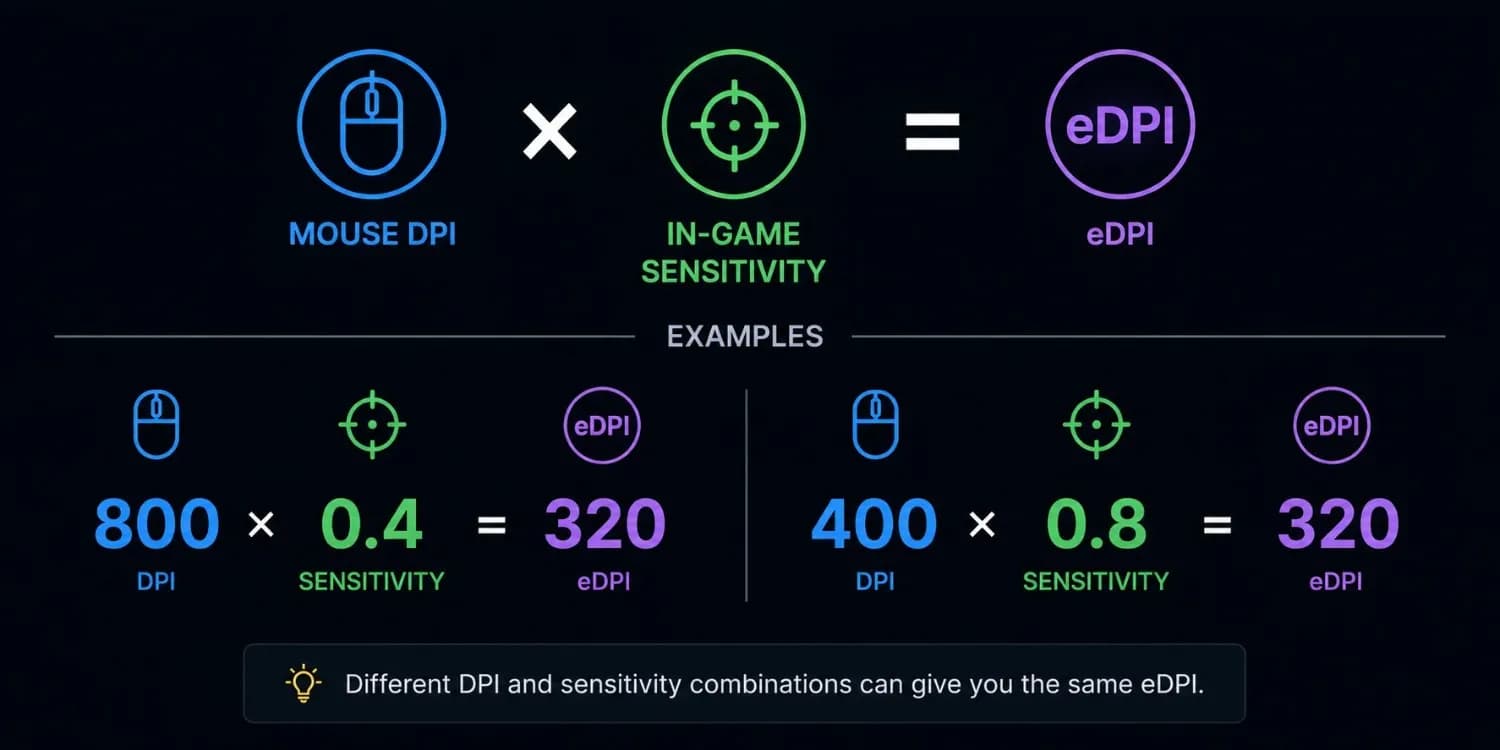
Two players can have completely different hardware and software settings and end up with the same real-world aim feel, if their eDPI matches. Take these two setups:
| Player | DPI | In-Game Sensitivity | eDPI |
|---|---|---|---|
| Player A | 800 DPI | 0.40 sensitivity | 320 eDPI |
| Player B | 400 DPI | 0.80 sensitivity | 320 eDPI |
Same eDPI. Same physical crosshair movement. The settings look different, but the experience is identical. This is why eDPI is the only number worth comparing across setups and across players.
Why eDPI Matters More Than DPI Alone
A lot of players who ask how to find their eDPI are doing so because something feels off. Maybe their crosshair overshoots at range. Maybe their aim on stationary targets feels fine, but tracking moving ones falls apart. These are symptoms of an eDPI that is too high for the game they are playing.
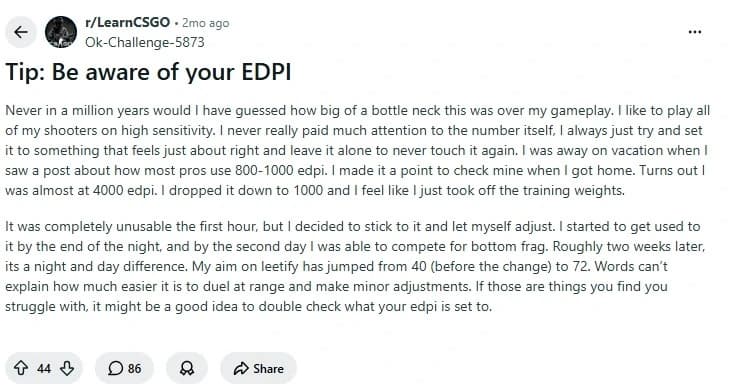
One CS2 community thread captured this clearly. A player had been running roughly 4,000 eDPI for nine years without questioning it. When they finally calculated their eDPI and dropped to 1,000, they described the change as taking off training weights. Their aim score jumped from 40 to 72 within two weeks, not because their mechanics improved overnight, but because their hardware was no longer working against them.
Recommended eDPI Ranges by Game
The right eDPI is not the same across every game. Different engines scale mouse input differently, which means an eDPI of 800 in Valorant and an eDPI of 800 in Overwatch 2 feel nothing like the same thing in practice. Looking for an eDPI that works for Overwatch and then plugging that into CS2 will always feel wrong, and vice versa.
The table below shows the bands where the majority of competitive and high-level players land, per game. These are real-world ranges drawn from observed pro data and community discussion, not theoretical recommendations.
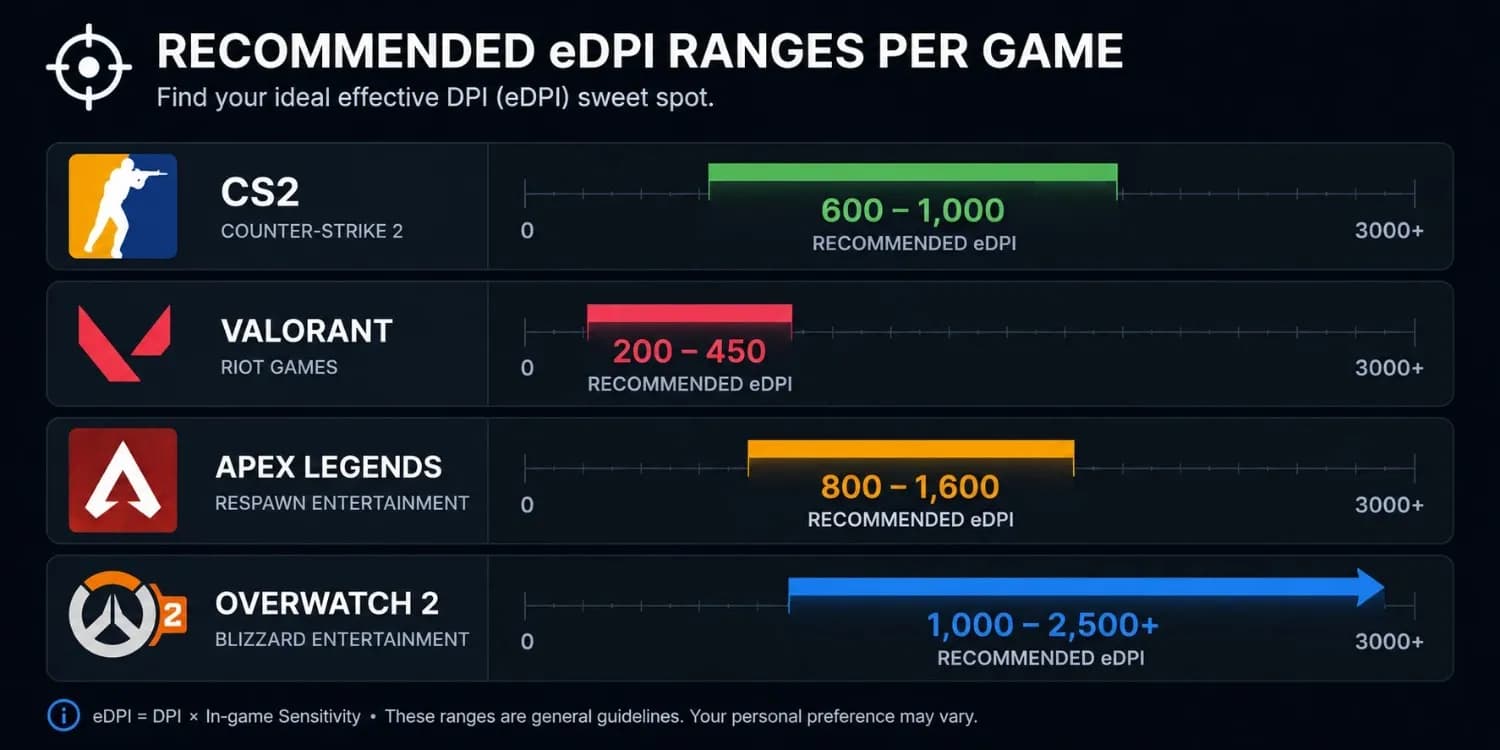
| Game | Common eDPI Range | Why This Range Works | Notes |
|---|---|---|---|
| CS2 / CS: GO | 600 – 1,000 | Angle holding, precise long-range taps, counter-strafing | Anything above ~1,400 makes micro-corrections harder at range |
| Valorant | 200 – 450 | Precise headshot placement, slow-paced duels, stutter-stepping | The pro average sits around 275–320 eDPI. Sub-200 is usable but arm-intensive |
| Apex Legends | 800 – 1,600 | Fast tracking, vertical movement, and legend mobility | Higher eDPI is accepted here; the game rewards quicker rotations |
| Overwatch 2 | 1,000 – 2,500+ | Target swapping, fast hero movement, 180-degree recovery | OW2 engine scales differently, eDPI looks high by CS2 standards, but plays normally |
| Fortnite | 50 – 80 (% scale) | Building, fast edits, close-range sprays | Fortnite uses percentage-based sensitivity; eDPI comparisons differ from other titles |
Pro tip:
Best eDPI for Valorant
The Valorant player base runs some of the lowest eDPI figures of any major FPS. Top-ranked players regularly sit below 250 eDPI, and the professional scene clusters tightly between 190 and 320. The game rewards precise crosshair placement on static angles over fast reactive flicking, which means lower eDPI tends to pay off more here than in games with heavier movement.
A player in the Valorant community had been running at 370 eDPI for years and hitting shots fine, but struggling with micro-adjustments at range. After dropping to 288 eDPI, the micro-adjustment issue was resolved. The core lesson: shots can land at higher eDPI, but fine-tuning becomes harder the further above the competitive band you sit.
Best eDPI for CS2
CS2 sits at the low end of comfortable eDPI ranges across all major shooters. The community consensus, backed by what most FACEIT Level 10 players and pros actually use, is that 800–1,000 eDPI is a solid target. Anything above 1,400 starts limiting precision at medium and long range, where the game is frequently decided.
FlameZ is a notable outlier at around 1,440 eDPI and is a top-three-ranked player, but he is genuinely exceptional. For the vast majority of competitive players, staying below 1,200 eDPI gives a measurable advantage in firefights that come down to a few pixels.
Best eDPI for Overwatch 2
Overwatch 2 is the outlier. If this is your game, the Overwatch eDPI calculator result will look alarming compared to CS2 or Valorant, and it should. The game engine uses a completely different input scaling system. A result of 3,200 eDPI in Overwatch plays the way 800 eDPI plays in CS2. The comparison is not apples to apples.
The practical target for Overwatch 2 is 1,000–2,500 for most players, with pros commonly running higher depending on their hero pool. If you mostly play mobile heroes or supports with short-range abilities, a higher eDPI makes sense. Tank players and hitscan DPS players often prefer the lower end of that band.
High eDPI vs Low eDPI: What Actually Happens to Your Aim
The choice between high and low eDPI is not just a preference. It has real mechanical consequences that show up differently depending on what you are doing in-game.
| eDPI Level | Best For | Trade-Off |
|---|---|---|
| Very Low (under 400) | CS2, Valorant long-range precision, AWP play | Needs a large mousepad + arm movement for 180-degree turns |
| Low (400–800) | FPS standard, precision at range, consistent micro-adjustment | Some fast-reaction plays need arm involvement |
| Medium (800–1,600) | Balanced for most shooters, works across ranges | Micro-corrections at long range get slightly harder |
| High (1,600–3,200) | Overwatch 2, Apex mobility characters, fast duels | Precision at range degrades, resulting in more errors per hand movement |
| Very High (3,200+) | Rare in competitive play except OW2 | Micro-adjustments almost impossible in tactical FPS games |
The pattern across competitive communities is consistent: high eDPI is fine for games built around fast rotations and hero swapping. In tactical shooters where a single headshot ends the round, the error margin introduced by high eDPI becomes a real handicap.
Your aiming style also matters. Wrist aimers, those who do most of their movement from the wrist rather than the forearm, tend to do better at 800–1,600 eDPI because their range of motion is limited. Arm aimers can push lower without the setup feeling cramped, especially on a large pad. If you are forcing yourself to very low eDPI but naturally aim with your wrist, the gain may not materialise. Run your numbers through the mouse sensitivity analyzer to see whether the trade-off is actually worth it for your style.
eDPI Converter Between Games: Keeping Your Aim Feel
Knowing your eDPI is step one. The more common problem is when you switch games, and everything suddenly feels wrong, even though you carried your DPI and sensitivity across exactly as they were. This happens because eDPI does not transfer directly between games with different engine scaling.
The CS2-to-Valorant switch is the most common case. Both games display sensitivity to what looks like the same scale (0.1 to 10.0). But CS2 uses a Source Engine yaw of 0.022, while Valorant uses a completely different multiplier. Copy-pasting 1.5 from CS2 into Valorant does not preserve your feel; it changes it significantly. Our Valorant to CS2 sensitivity conversion walkthrough covers the exact multipliers if you want the full breakdown.
| Conversion | Method | Example |
|---|---|---|
| CS2 → Valorant | Multiply your CS2 sensitivity by 0.314 | CS2 sens 1.5 → Valorant sens 0.471 |
| Valorant → CS2 | Multiply your Valorant sensitivity by 3.1818 | Valorant sens 0.35 → CS2 sens 1.113 |
| CS2 → Apex Legends | Use the full converter; Apex has its own yaw | Cannot convert manually with a simple multiplier |
For anything beyond a two-game CS2-Valorant swap, the manual maths gets complicated fast. Use the mouse sensitivity converter to handle multi-game conversions accurately, including cases where you are also changing DPI at the same time.
eDPI vs DPI: Which Number Actually Controls Your Aim
These two terms get used interchangeably in gaming discussions, but they describe different things and serve different purposes.
| Setting | Where It Lives | What It Controls | Can You Change Mid-Game? |
|---|---|---|---|
| DPI | Mouse hardware/driver software | Pixels the cursor moves per physical inch of movement | No, needs mouse software or DPI button |
| In-Game Sensitivity | Game settings menu | A software multiplier on top of DPI is applied by the game engine | Yes, from the settings menu anytime |
| eDPI | Calculated value | Your real-world aim speed is the combined output of DPI and sensitivity | N/A, changes whenever either value changes |
One common misconception: you can change your DPI through Windows Display Settings by adjusting Scale and Layout. That changes the size of your desktop UI; it does not affect mouse sensitivity. To change the actual DPI, you need your mouse's own software or the physical DPI button on the device itself.
If you ever change your hardware DPI, even by pressing the button on your mouse accidentally, recalculate your eDPI before your next session. The in-game feel you had is gone until both numbers are back in the right relationship.
Pro Player eDPI Settings: What the Top Players Actually Use
Pro player settings are widely discussed in the FPS community, but raw numbers without context tend to mislead. Copying a pro's eDPI makes no sense without understanding their aiming style, desk setup, and whether they have been using that setting for five years. What the data is useful for is understanding the range your game operates in at the top level.
| Player Group | Common eDPI Range | Context |
|---|---|---|
| CS2 / CS: GO pros | 600 – 1,000 eDPI | Most cluster around 800. Sub-600 is uncommon but not rare. Above 1,400 is genuinely unusual at the top level. |
| Valorant pros | 190 – 450 eDPI | The average sits around 275–320. Demon1 plays at roughly 160 eDPI, among the lowest in the professional field. |
| Apex Legends pros | 800 – 1,600 eDPI | Higher values are accepted here. Fast-movement plays and legendary abilities reward a quicker crosshair. |
| Overwatch 2 pros | 3,000 – 7,000 eDPI | Not comparable to other games. OW2 engine scaling makes these numbers normal, not extreme. |
The more useful takeaway from pro settings is the direction, not the exact number. Nearly every pro in tactical FPS games has moved toward lower eDPI over time, because lower eDPI gives more physical distance per pixel of screen movement, which makes small corrections more forgiving and more consistent.
What Is Mouse DPI and How Does It Feed Into eDPI?
Mouse DPI, or Dots Per Inch, is a measure of sensor sensitivity. It describes how many pixels your cursor moves for every inch you physically move the mouse on a surface. A mouse set to 800 DPI moves the cursor 800 pixels for each inch of travel.
The technically correct term is CPI, Counts Per Inch, because mouse sensors report coordinate counts, not printed dots. But DPI has been the industry default term for so long that CPI is mostly used in hardware engineering contexts. For all practical purposes, they mean the same thing.
For a deeper guide on what mouse DPI actually means and how to choose a starting point for your setup, our DPI recommendations by use case guide covers it from the ground up.
Common eDPI Mistakes to Avoid
Using Your Configured DPI Instead of Your Measured DPI
The DPI shown in your mouse software is the firmware target, which the sensor is trying to hit. Real-world output can drift 5–10% due to sensor variance, mouse pad friction, and firmware interpolation. If your eDPI calculation is built on a number that is 6% off, your sensitivity converter output and aim trainer settings are also 6% off. Measure before you calculate. See how accurate a DPI analyzer really is for more on why the gap happens.
Changing eDPI Mid-Competition and Expecting Immediate Results
Dropping from 4,000 eDPI to 1,000 eDPI in a single session is brutal. Your muscle memory will fight you for days, and your performance will get worse before it improves. The first hour will feel unusable. By the end of the second day, you will be functional. By two weeks in, most players report significant measurable improvement, but the short-term cost is real. Do not judge a sensitivity change in the first session.
Ignoring Windows Pointer Acceleration
With Windows Enhanced Pointer Precision active, your cursor speed changes based on how quickly you physically move the mouse. Slow movements produce lower effective DPI. Fast movements produce higher effective DPI. This means your eDPI is not a fixed number at all; it fluctuates every time you change hand speed. Any eDPI calculation or sensitivity setting is meaningless until you disable it.
To turn it off:
- 1Windows Settings
- 2Additional Mouse Settings
- 3Pointer Options
- 4Uncheck Enhance Pointer Precision.
Comparing eDPI Numbers Across Different Games
An eDPI of 4,800 in Overwatch 2 and an eDPI of 4,800 in Valorant are not the same experience. The engines handle input on completely different scales. Always compare eDPI within a single game or use CM/360, centimetres per full 360-degree rotation, as the universal reference when comparing across titles.
Conclusion
This eDPI calculator gives you the number that actually controls your aim, not the DPI on the mouse box, not the sensitivity in the game menu, but the real combined output of both. Once you know it, you can compare it against your game's recommended range, decide whether to adjust, and make changes that are grounded in numbers rather than instinct.
Most players who find their eDPI for the first time discover it is either significantly above or below where competitive players in their game tend to sit. That gap is usually the clearest explanation for aim problems that hours of practice alone have not fixed.
After you find your eDPI, the natural next step is to carry that feel into every game you play. The mouse sensitivity converter uses your eDPI as the anchor and converts it to any supported title using accurate engine-specific maths, so what you build here moves with you.
Related Tools and Guides
- DPI AnalyzerMeasure the DPI your mouse sensor actually delivers, using nothing but a ruler and your browser.
- Mouse Sensitivity AnalyzerEnter your DPI, sensitivity, and game type to get a genre-fit verdict and a tuning range for your aim.
- Mouse Sensitivity ConverterCarry the exact same aim feel from one game to another using cm/360 and engine-specific yaw values.
- DPI Recommendations for Every ScreenThe right DPI for every screen size and resolution — from 1080p to 4K and multi-monitor setups, with pro references.
See if your setup is holding you back
Open the Sensitivity AnalyzerFrequently Asked Questions
eDPI stands for Effective Dots Per Inch. It is calculated by multiplying your mouse DPI by your in-game sensitivity. The result is the single number that represents your true aim speed, combining hardware and software settings into one comparable figure.
Multiply your mouse DPI by your in-game sensitivity. If your mouse is set to 800 DPI and your in-game sensitivity is 0.35, your eDPI is 280. You can use the calculator above or work out your eDPI manually with that formula.
The competitive range for Valorant is typically 190–450 eDPI, with most high-ranked players clustering around 275–320. If your eDPI is above 600 in Valorant, micro-adjustments at range will become noticeably harder.
Most CS2 professionals use 600–1,000 eDPI. The vast majority sit between 700 and 900. Going above 1,400 is rare at the top level, and most players who do so are outliers with highly refined mechanics.
It depends on the game. For CS2 and Valorant, 800 eDPI is at the upper edge of the typical competitive range, workable but potentially limiting for micro-adjustments. For Apex Legends, 800 eDPI is well within the normal competitive band. For Overwatch 2, 800 eDPI would feel extremely slow.
For tactical FPS games like CS2 and Valorant, 1,600 eDPI is generally considered above the range where precision is easiest. For movement-heavy games like Apex or Overwatch 2, it sits comfortably within normal limits. The answer depends entirely on the game.
No. Different games use different engine scaling, so the same eDPI number produces different actual movement speeds across titles. Use CM/360, centimetres per 360-degree rotation, as the universal metric when carrying your feel from one game to another. The sensitivity converter handles the game-specific maths automatically.
Open your mouse software and note your DPI. Open your game and check the sensitivity setting. Multiply the two. That is how to find your eDPI manually. If you want to verify that your configured DPI matches what your sensor is physically delivering, use the DPI Analyzer to measure it.
Your mouse pad affects your real hardware DPI output, which flows into your eDPI. Cloth pads introduce micro-friction that can cause the sensor to under-report by a few percent. Glass and hard surface pads track more consistently. If precision matters, measure your actual DPI rather than trusting the software figure.
Run a physical measurement test with the DPI Analyzer tool. It measures your actual sensor output using a ruler and your browser, no software to install. Use that measured number in the eDPI calculator for a result that reflects reality rather than the manufacturer's target.